4 × 6 Inch Image Resolution Checker
The standard snapshot print. At 300 DPI, you need 1200 × 1800 pixels (2.16 Megapixels).
Drop your image here
or browse from your device
Calculate manually without an image
Enter pixel dimensions or physical inches/cm to calculate DPI and print sizes directly.
4 × 6 in Complete Dimensions & Resolution Blueprint
Most popular snapshot photo print for albums and postcards.
Required Pixels for 4 × 6 in by DPI Quality Level
| Print Quality | DPI | Required Pixels (W × H) | Megapixels | Use Case Recommendation |
|---|---|---|---|---|
| Draft Screen Only | 72 DPI | 288 × 432 px | 0.12 MP | Web & draft display only (soft on paper) |
| Newspaper / Poster | 150 DPI | 600 × 900 px | 0.54 MP | Good for distance viewing (>3 ft / 1 meter) |
| Desktop Photo | 200 DPI | 800 × 1,200 px | 0.96 MP | Solid desktop / home laser printer quality |
| Commercial Print | 300 DPI | 1,200 × 1,800 px | 2.16 MP | Close inspection: Photo lab & fine press benchmark |
| Fine Art / Archival | 600 DPI | 2,400 × 3,600 px | 8.64 MP | Ultra-fine archival giclée & sharp vector text |
While 300 DPI (1,200 × 1,800 px) is the standard benchmark for close-up handheld viewing, it is not universally mandatory for every printing project. The appropriate resolution depends on four key factors:
Quick Answer: What Is the Pixel Size for a 4x6 Photo?
At standard 300 DPI photo quality, the best pixel size for a 4x6 print is 1200 × 1800 pixels (2.16 megapixels) in portrait orientation, or 1800 × 1200 pixels in landscape orientation.
Digital images are measured in pixels, while physical photo prints are measured in inches or centimeters. The relationship between digital pixels and printed size is determined by DPI (dots per inch) or PPI (pixels per inch). Calculate pixel dimensions for any 4×6 print using this simple formula:
Pixels = Print Size in Inches × DPI
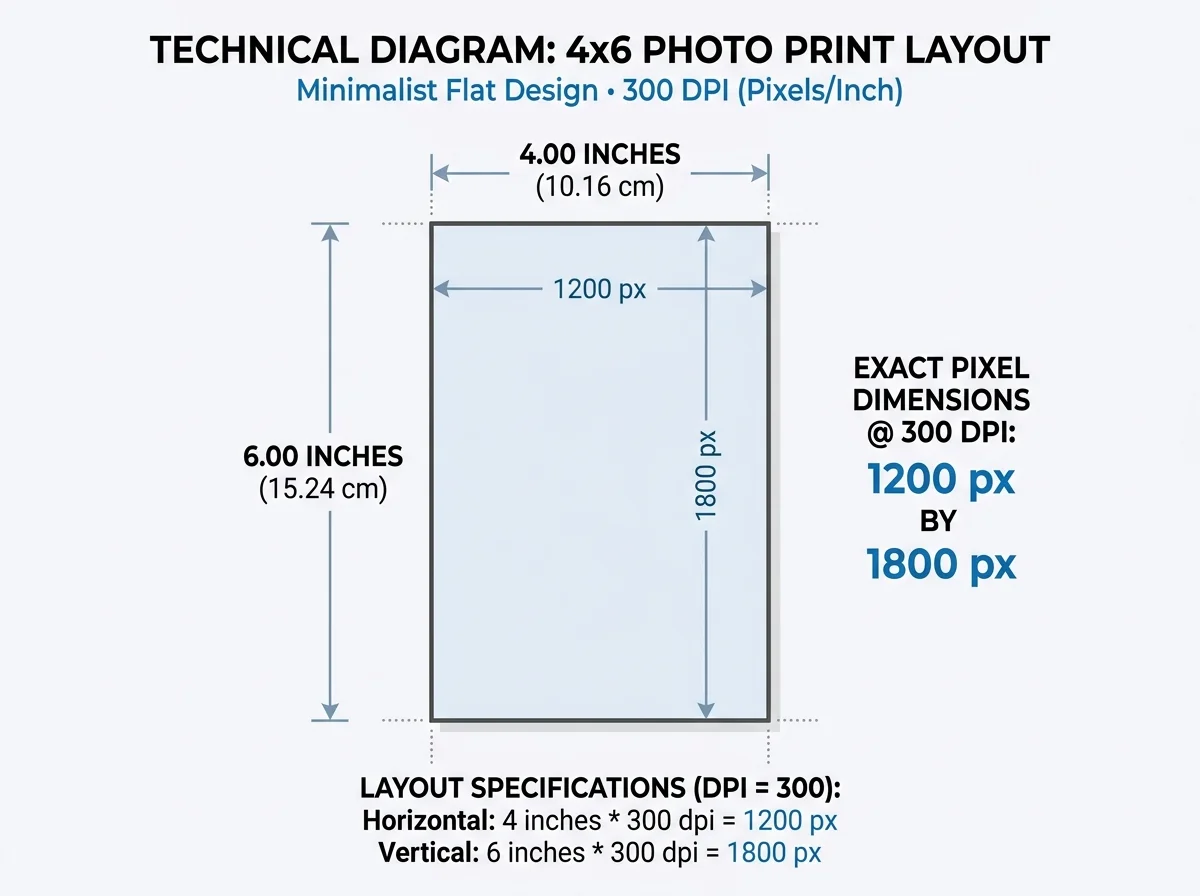
• Pixel Width: 4 inches × 300 DPI = 1200 pixels
• Pixel Height: 6 inches × 300 DPI = 1800 pixels
These dimensions represent the baseline for lab-quality sharpness. An image with more pixels (such as an uncropped 12MP or 24MP camera file) will print with pristine detail, while images below 1200 × 1800 px may begin to lose sharpness.
4x6 Photo Dimensions in Pixels (Resolution Chart)
Depending on your printer type, paper substrate, and viewing distance, a 4 × 6 photo can be printed at several common DPI levels. Use this reference chart to find exact pixel dimensions for 4x6 prints:
| Resolution (DPI) | 4x6 Dimensions in Pixels (Portrait) | 4x6 Dimensions in Pixels (Landscape) | Megapixels | Quality & Recommended Use |
|---|---|---|---|---|
| 600 DPI | 2400 × 3600 pixels | 3600 × 2400 pixels | 8.64 MP | Ultra-fine archival prints, museum exhibitions, and high-detail fine art |
| 300 DPI | 1200 × 1800 pixels | 1800 × 1200 pixels | 2.16 MP | Optimal benchmark for photo lab prints, snapshot albums, and frame displays |
| 200 DPI | 800 × 1200 pixels | 1200 × 800 pixels | 0.96 MP | Good quality for home inkjet or laser printers viewed at arm's length |
| 150 DPI | 600 × 900 pixels | 900 × 600 pixels | 0.54 MP | Minimum acceptable resolution for casual proofs or draft prints |
| 72 DPI | 288 × 432 pixels | 432 × 288 pixels | 0.12 MP | Screen displays and web previews only (pixelated and blurry if printed) |
At 300 DPI, 1200 × 1800 pixels provides 300 dots of ink per linear inch, ensuring sharp facial details, clear fine lines, and no visible pixelation when inspected in handheld photo albums.
Physical Dimensions of a 4x6 Photo (Inches, CM, and Aspect Ratio)
Understanding the physical dimensions and aspect ratio of a 4x6 print ensures your photos fit standard frames, postcard sleeves, and albums:
• Physical Size in Inches: Exactly 4.0 × 6.0 inches.
• Physical Size in Centimeters: Exactly 10.16 × 15.24 cm (commonly labeled 10.2 × 15.2 cm or 10 × 15 cm in international photo labs).
• Physical Size in Millimeters: 101.6 × 152.4 mm (standard prepress 102 × 152 mm).
• Aspect Ratio: A 4 × 6 photo has an aspect ratio of 2:3 (or 3:2 in landscape).
Why 4x6 Is the Photography Standard:
The 2:3 aspect ratio is identical to standard 35mm film and the native sensor ratio of modern DSLR and mirrorless cameras. Photos shot on full-frame or APS-C cameras fit a 4 × 6 frame with zero cropping. In contrast, smartphones typically capture in a 4:3 aspect ratio, requiring a slight crop along the long edges to fit 4 × 6 paper. If you prefer a desktop frame with less cropping from phone photos, consider 5 × 7 image resolution or a classic 8 × 10 image resolution. You can also prepare and crop pictures using our free image resizer.
How to Check Your 4x6 Photo Resolution Online
You can verify whether your digital photo is ready for a 4 × 6 inch print using the free checker above:
1. Upload or drag and drop your photo into the box above. The tool automatically reads pixel dimensions and calculates the effective DPI for a 4 × 6 print.
2. If you already know your image's pixel width and height, click "Open Manual Calculator" to calculate effective DPI without uploading a file.
3. Review your quality rating: 300 DPI or higher displays an "Ultra Fine" green badge, 200–299 DPI shows "Very Good", and 150–199 DPI displays "Good".
All checks run locally in your browser with complete privacy. To compare requirements across other photo sizes, explore our 300 DPI image size chart or compute custom sizes using the image print size calculator.
Technical Diagram: 4x6 Photo Print Layout
Detailed layout showing the exact required pixel dimensions of 1200 x 1800 pixels at 300 DPI for a standard 4x6 photo print.
Frequently Asked Questions
At 300 DPI, a 4 × 6 photo requires 1200 × 1800 pixels (2.16 megapixels) in portrait orientation, or 1800 × 1200 pixels in landscape orientation.